 Spektiq
Self-Hosting AI: Work Out What a Local LLM Costs
· 13 min read
Self-hosting AI: pick a runtime first
Self-hosting AI comes down to four steps: install a runtime, fit a quantized GGUF model's weights and context in graphics memory, check with ollama ps that nothing spilled onto the CPU, then measure what each answer costs against an API. Self-hosting is not free once the hardware is bought: electricity, idle draw, depreciation and setup time are real costs, and the cheapest token can be a small API model, depending on your volume and hardware. It wins on privacy, control, offline use and a mostly upfront cost, not automatically on price. Tool defaults were checked on 2026-10-12, the OpenAI-compatible API, measurement counters, prices and cost sources on 2026-10-26.
Ollama suits people who want a command line and an API: a single-script install on macOS, Windows and Linux, an official Docker image and a local REST API, per its GitHub repository.
LM Studio suits people who prefer a desktop app with a built-in Hugging Face downloader; per its system requirements (checked on 2026-10-12), Macs need Apple Silicon and Windows x64 needs an AVX2 CPU.
llama.cpp suits people who want the engine itself: an MIT-licensed C/C++ project whose project page treats Apple Silicon as a first-class citizen, with CUDA (NVIDIA), HIP (AMD), Metal, Vulkan and SYCL (Intel) backends.
Its llama-server exposes OpenAI-style routes, but its server documentation (listed in the table's sources) claims no strict OpenAI compatibility: test the routes your tool needs.
Ollama has a similar bridge: its OpenAI compatibility page (read on 2026-10-26) documents an API under localhost at /v1/. The local server needs no key, but some OpenAI SDKs insist on one: a placeholder works, and Ollama ignores it. It is a subset (tool_choice, logit_bias, user and n are not implemented), so test your tools rather than assume a drop-in replacement.
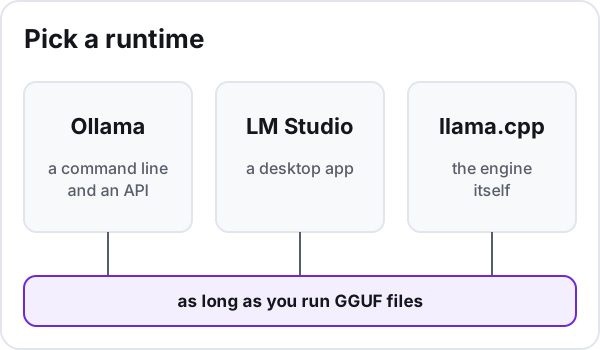
This walkthrough uses Ollama because ollama ps makes failures visible. As long as you run GGUF files, the memory arithmetic does not change with the front end. The formula is the same in all three runtimes: weights plus context plus buffers. The weights match; each runtime sets its own context and buffers.
First run with Ollama, and what it does by default
Install Ollama for your system, pick a model from the Ollama model library, and start it:
ollama run <model>
Replace <model> with a local variant: the library also lists cloud models, which run in Ollama's cloud, and the memory checks below do not apply to them.
A few defaults surprise newcomers, per the Ollama FAQ, read on 2026-10-12:
- It only listens on your machine. Ollama binds to 127.0.0.1; setting
OLLAMA_HOSTto another address exposes it on your network. Ollama ignores the API key sent to its OpenAI-compatible endpoint (see above), so a key does not protect an exposed server: never open it to the internet, and open it to your network only on purpose. - The model stays loaded for a while. Ollama keeps it in memory a few minutes after use;
keep_aliveorOLLAMA_KEEP_ALIVEkeeps it loaded indefinitely or frees memory at once. That matters for cost: a loaded model keeps memory occupied, so measure idle draw with the model loaded and unloaded.
Three things make a first attempt fail: the file you download, the context you ask for, and where the model loads.
Format vs quantization: what you download
The first failure point is the file, where two ideas get mixed up.
The format is the container. GGUF is a binary format built to load and save models quickly for inference and, unlike tensor-only formats such as safetensors, it carries a standardized set of metadata. llama.cpp, LM Studio, GPT4All and Ollama all read it, and Hugging Face's GGUF documentation shows how to filter and inspect GGUF models before downloading.
The quantization is the level of compression applied to the weights inside that file. The K types and IQ types are current; Hugging Face calls Q4_0, Q4_1, Q5_0 and Q8_0 legacy methods rarely used today, so Q8_0 sits in the table as a size reference only.
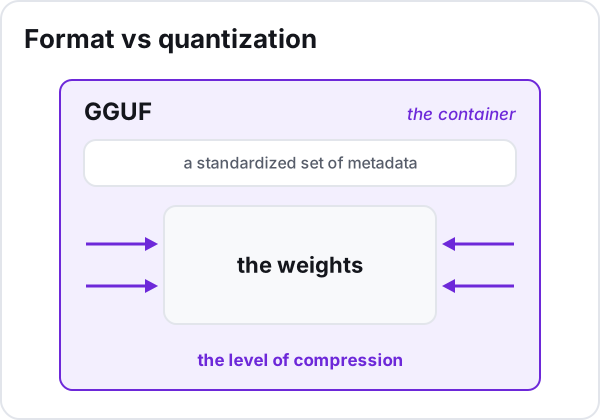
So the practical question is: at each quantization level, how much memory do the weights alone need?
| Model | Parameters (model card) | Q4_K_M (4.8944 bits/weight) | Q6_K (6.5633 bits/weight) | Q8_0 (8.5008 bits/weight) | F16 (16.0005 bits/weight) | Sources |
|---|---|---|---|---|---|---|
| Qwen2.5-7B-Instruct | 7.61 billion | 4.7 GB | 6.2 GB | 8.1 GB | 15.2 GB | [1] [2] |
| Qwen2.5-14B-Instruct | 14.7 billion | 9.0 GB | 12.1 GB | 15.6 GB | 29.4 GB | [1] [3] |
| Qwen2.5-32B-Instruct | 32.5 billion | 19.9 GB | 26.7 GB | 34.5 GB | 65.0 GB | [1] [4] |
| Qwen2.5-72B-Instruct | 72.7 billion | 44.5 GB | 59.6 GB | 77.3 GB | 145.4 GB | [1] [5] |
Each value is computed, not measured: parameters × bits per weight ÷ 8, in decimal gigabytes (1 GB = 10^9 bytes, slightly less than one GiB).
The bits-per-weight figures were measured by the llama.cpp project on Llama 3.1 8B files. Applied to other models they estimate the size of the weight file; they are not a measured size for that model.
llama.cpp's quantization README states that memory and disk requirements are the same because models are fully loaded into memory. The llama-server README is more nuanced: the server memory-maps the weight file (mmap) rather than locking it in RAM (mlock) unless asked to, and its --lazy-mode option reads certain tensors, such as per-layer embeddings, from disk on demand instead of keeping them resident. Reading from disk is slower than reading from memory, so the figures here describe the weights fully resident: to run at full speed, the weight file has to fit in RAM, in VRAM, or across both.
This table counts the weights only. It does not count the memory a runtime uses for the conversation context or its own buffers, so it is a lower bound, not a full hardware requirement.
Lower-bit formats trade quality for size. The table says what fits, not how well a given format answers.
Sources
- llama-quantize README, Memory/Disk Requirements and Quantization sections (measured on Llama 3.1 8B), ggml-org/llama.cpp (GitHub), read on 2026-10-05
- Qwen2.5-7B-Instruct model card, Qwen (Hugging Face), read on 2026-10-05
- Qwen2.5-14B-Instruct model card, Qwen (Hugging Face), read on 2026-10-05
- Qwen2.5-32B-Instruct model card, Qwen (Hugging Face), read on 2026-10-05
- Qwen2.5-72B-Instruct model card, Qwen (Hugging Face), read on 2026-10-05
- llama-server README, model loading options (--load-mode, --lazy-mode), ggml-org/llama.cpp (GitHub), read on 2026-10-12
Context memory and CPU spillover: the diagnostic loop
The second failure point is the one the table does not count. Ollama's context length documentation, read on 2026-10-12, says a longer context needs more memory, the default length depends on available VRAM, and a large context is recommended for web search, agents and coding tools.
So a model that fits for chat can overflow for an agent or code assistant: test with the context your real tool asks for. Coding tools can fill the context quickly, as our guide to the best local LLM for coding explains.
In the Ollama FAQ (read on 2026-10-12), OLLAMA_KV_CACHE_TYPE quantizes the K/V cache that holds the context to reduce its memory use. It requires Flash Attention and applies to every model you run: verify the saving rather than count on it.
Weights from the table, plus context, plus runtime buffers, must fit in VRAM for the model to stay off the CPU. The rows apply only to the listed models; otherwise the GGUF file you chose is the floor for the weights.
To see the third failure point, run this with a model loaded:
ollama ps
PROCESSOR shows where the model sits: GPU alone means it fits on the card, CPU and GPU means part of it spilled. CONTEXT shows the context actually allocated.
A model larger than your VRAM can still run, split between GPU and CPU, as long as system memory holds the rest, which llama.cpp calls hybrid inference. The price is speed, and Ollama advises avoiding CPU offload.
That gives you a diagnostic loop you can repeat with any model:
- Run the model with the context your real use needs.
- Read PROCESSOR and CONTEXT in
ollama ps. - If you see CPU only, check GPU support, driver and detection: compare your card and driver against Ollama's GPU documentation (read on 2026-10-12) and confirm that Ollama detected the GPU.
- If you see a split, reduce the context, try K/V cache quantization, pick a lighter quantization or a smaller model.
- Run it again and check again, until the GPU-only reading comes back or you accept the slower split.
If ollama ps shows a split on a modest card, see our guide to running a local LLM on a small graphics card.
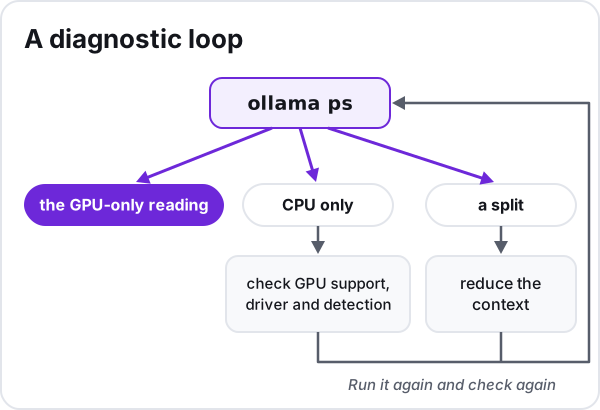
That configuration, GPU-only or a split you accept, is the one you measure for cost.
Measure what your setup costs
Throughput. On Ollama's native endpoints that report metrics, the final response carries counters, per the API usage documentation (read on 2026-10-26): total_duration, load_duration, prompt_eval_count, prompt_eval_duration, eval_count and eval_duration, all timings in nanoseconds. When streaming, they arrive in the last chunk, where done is true. Generation speed is eval_count divided by eval_duration converted to seconds; load_duration shows how long loading the model took, the time a cold start adds.
For llama.cpp, llama-bench measures prompt processing and generation, averages repeated runs with a standard deviation, and excludes tokenization and sampling. Never trust a single run: without a spread, you cannot tell noise from a real difference.
llama-bench -m <model.gguf> -o md
Power. On NVIDIA cards, nvidia-smi reports the whole card's average draw over a short recent window on Ampere (except GA100) or newer, plus an instantaneous reading, with no documented accuracy bounds. Sample it repeatedly across whole requests (loading, prompt processing and generation) and average, then measure again at idle. It covers the card only: processor, memory and power-supply losses come on top, most of all when part of the model runs on the CPU, so treat it as the GPU's share of the bill.
Do not take total graphics power or required system power as the draw: NVIDIA's RTX 5090 page calls its system power figure a minimum for a specific configuration. A spec-sheet figure is a rating for sizing a system, not a measurement of your draw.
On a Mac mini, Apple publishes idle and maximum consumption (idle meaning only Finder open; Mac Studio is not covered): reference measurements from Apple's own test setups, not bounds on your load, so measure at the wall while your model runs.
Tariff, read on 2026-10-26. In the US, the EIA monthly state table gives average residential prices, the latest months preliminary, with a large gap between states.
In the EU, Eurostat publishes household prices including taxes per semester, with a wide spread between member states.
Assembly, in words, with each cost counted once. Variable cost per answer: the average power over the whole request times its duration, total_duration in Ollama's counters, not eval_duration alone, which counts generation only; convert it to kilowatt-hours, your tariff's unit, and price it. Fixed cost per month: idle draw for the hours the machine sits unused, a share of hardware depreciation and your setup time; keep it out of the per-answer figure. Benchmarks give speed, not power: they only give timings inside the first term, never the energy drawn.
Compare with an API, a rented GPU or Ollama cloud
Prices live on the providers' pages, read on 2026-10-26, and none are copied here.
OpenAI's API price list has a discounted Batch tier for most of its main models (check each row against the Standard rates), and cheaper cached input.
Anthropic's pricing page offers a Batch discount on input and output and bills cache reads at a fraction of base input. It notes that Claude 4.7 and later produce more tokens for the same text, so per-token prices are not directly comparable.
Google's Gemini API pricing has a free tier on several models whose content is used to improve Google's products, unlike paid tier content on most models: a privacy cost, not only a price. The paid plan adds a Batch API reduction, and price changes for some models are announced from December 2026.
Two middle options are easy to forget. Hugging Face Inference Endpoints are priced hourly but billed by the minute while initializing or running, which suits occasional heavy jobs.
Ollama's cloud plans bill its cloud models, while models on your own hardware stay unlimited whatever the plan, per its pricing page and FAQ (read on 2026-10-26).
Break-even takes three moves. First, per answer: for the same task, set your local variable cost against the API's charge for it, input tokens at the input price plus output tokens at the output price, with any cache or batch rules that apply. prompt_eval_count and eval_count only approximate that bill, since the two models' tokenizers differ; one local answer pays for both, so do not split its cost across them. Second, per month: the local total is your volume times that variable cost, plus the fixed costs, once; the API total is your volume times its charge. Third, compare the totals as volume grows, without assuming they cross.
Under these assumptions, they cross only if the local variable cost per answer is below the API's charge: volume then pays back the fixed costs, and below that break-even the API is cheaper. A full local cost above the API price at today's volume does not rule a crossing out, since the fixed costs spread over more answers as volume grows. And a small local model is not equivalent to a frontier API model: compare at comparable quality, or say plainly that you are not.
When self-hosting wins
Self-hosting tends to win when privacy, offline use or control matter, and can win on cost when a machine you already paid for runs heavy or steady workloads. For light or bursty use, a small API model or a batch tier can win on raw price: check it with your own measurements and the dated price pages.
Next comes which model to put on the machine: see our guide to the best local LLM for your hardware. Tool defaults were checked on 2026-10-12, the OpenAI-compatible API, measurement counters, prices and cost sources on 2026-10-26; after an update, rerun ollama ps and recheck the price pages.